
Resume tailoring
Tailor your resume to each job description
Jobapplier tailors your resume to a job description by reading the skills the posting asks for and working the ones your resume misses into your own experience. Your employers, titles, dates and degrees stay exactly as you wrote them.
- Levels
- Off (the default), Light, Balanced and Aggressive
- Never changes
- Employers, job titles, dates, schools, degrees and work authorization
- File
- A one-column PDF named Resume.pdf, US Letter or A4
- Plan
- Free: 2 a day. Pro: no limit
How it works
- 1Upload your resume once. It becomes your master, which you can edit any time.
- 2Open a job from Greenhouse, Lever, Ashby, Workday or another career site and press Tailor. The posting's required and preferred skills were read when it came in.
- 3Each skill your resume lacks goes into the line whose work fits it, or into a new line under the role it fits best when the posting requires it.
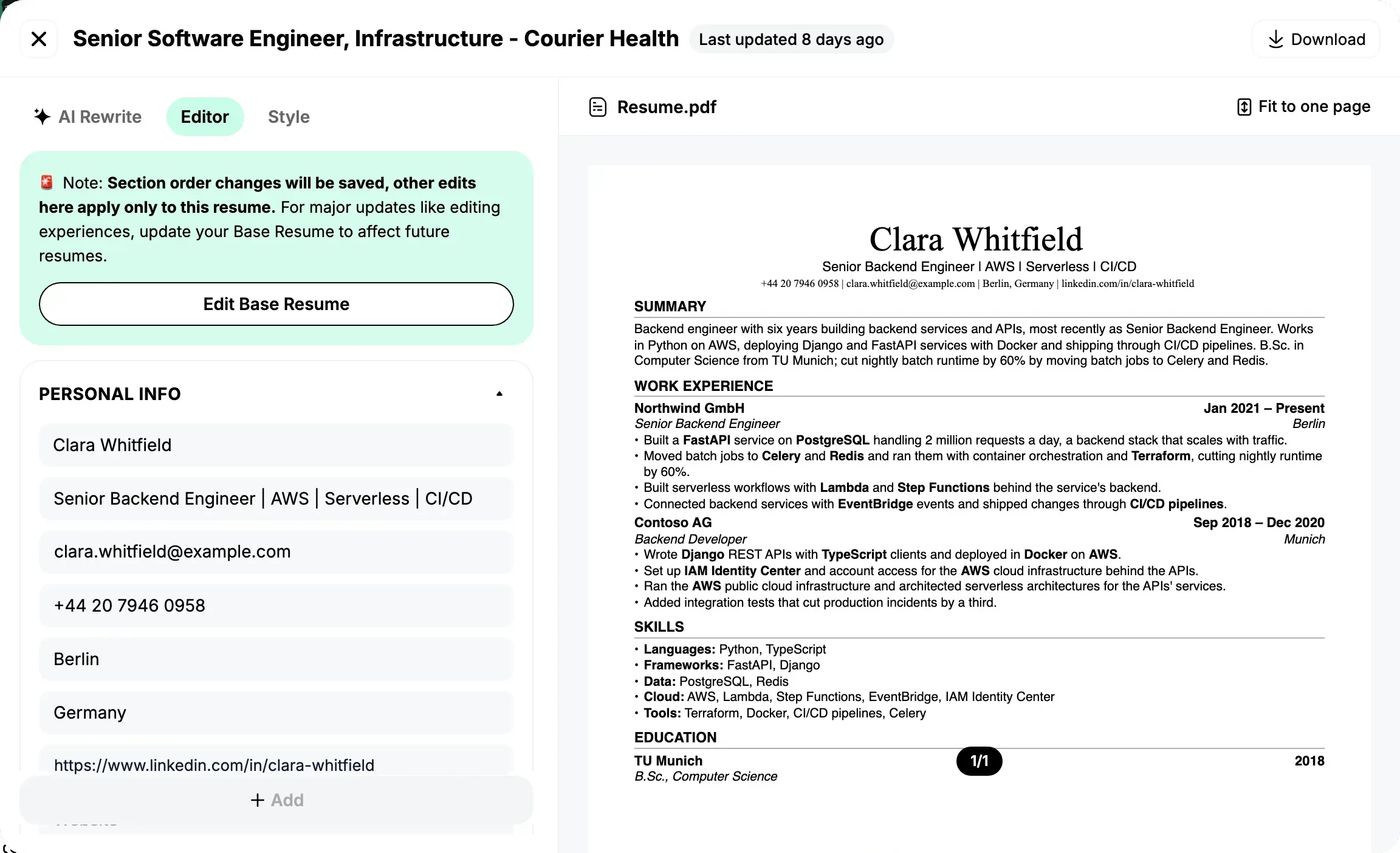
- 4Check the result beside its match before and after, edit any line, and download it.
What it does
- Levels you choose
- Off, the default, rewrites nothing with AI: only the posting's missing skills go into the lines they fit. Light adds a few of the job's words to your own lines. Balanced rewords every line for the job. Aggressive also restructures the lines for it.
- What it never changes
- No level adds or changes an employer, a job title, a seniority, a date, a place of work, a school, a degree, a certification or a work authorization. Only the headline at the top names the job you are applying for.
- Your own words stay
- A section you wrote yourself is locked: tailoring leaves it alone until you reset it.
- Ready for an ATS
- One column, standard headings, no tables or icons, US Letter for jobs in the US and Canada, A4 elsewhere. Every file is named Resume.pdf.
Good to know
- A preferred skill that fits none of your lines is not added, so the resume claims nothing your experience does not show; a programming language goes into its closest line.
- Fit to one page tightens the spacing; it never drops your lines, so a long resume can stay at two pages.
- Free tailors 2 resumes a day. With Pro, tailoring has no limit. See pricing.
Questions about resume tailoring
How do I tailor my resume to a job description?
Upload your resume once, open the job on Jobapplier and press Tailor. Jobapplier reads the required and preferred skills in the job description, works the ones your resume misses into the lines whose work fits them, and shows the new resume beside its match before and after. Edit any line, then download it as a PDF.
What do the tailoring levels do?
Off, the default, rewrites nothing with AI: only the posting's missing skills go into the lines they fit. Light adds a few of the job's words to your own lines. Balanced rewords every line for the job. Aggressive also restructures the lines for it. Every level adds the posting's missing skills the same way.
Will it add skills I do not have?
A required skill your resume lacks goes into the line whose work fits it, or into a new line under the role that fits it best, so read the result before you send it. A preferred skill that fits none of your lines is not added, except a programming language, which goes into its closest line. No level adds or changes an employer, a job title, a date, a school, a degree or a work authorization.
Is the tailored resume ATS-friendly?
Yes. It has one column, standard headings and no tables or icons, on US Letter for jobs in the US and Canada and A4 elsewhere, and every file is named Resume.pdf.
How much does it cost?
Free tailors 2 resumes a day. With Pro, tailoring has no limit. Pro costs $39.99 a month, $89.99 every 3 months or $17.99 a week. Sales tax or VAT is included, many countries pay less, and you can cancel any time.
How it compares
Guides
More of what Jobapplier does
- Auto applyAuto apply to jobs that fit your own rules
- Match scoreA resume job match score before you apply
- Cover letterAn AI cover letter generator that writes from your resume
- Browser extensionA job application autofill extension for your own browser
- Job boardSearch the jobs read from companies' career pages, no account needed