
Browser extension
A job application autofill extension for your own browser
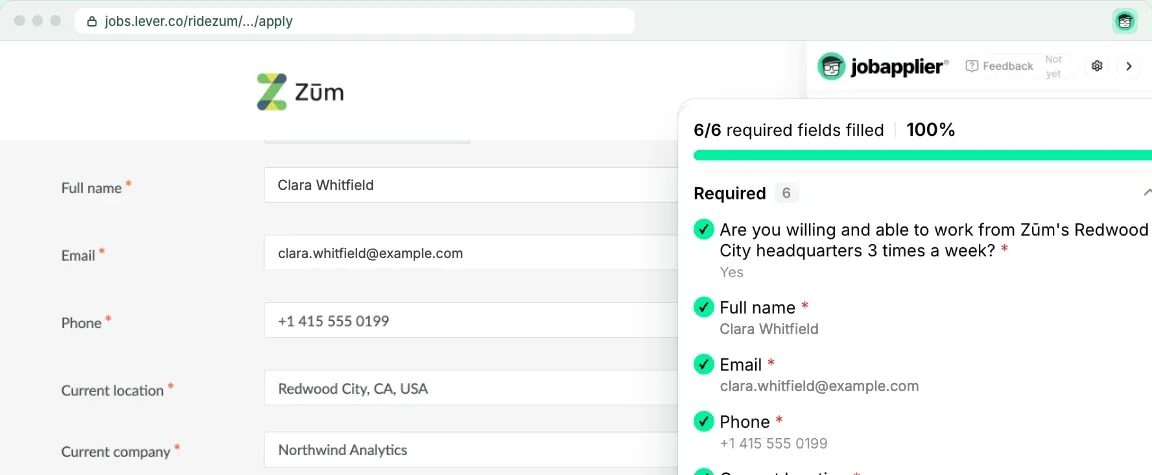
Jobapplier's job application autofill extension for Chrome fills forms on Greenhouse, Lever, Ashby, Workday and many other career sites, Workday's multipage forms included. Open a form and a panel opens beside it; press Autofill, and your details, your resume and answers written from it go in. You check it, then you press Submit.
- Fills
- Greenhouse, Lever, Ashby, Workday, iCIMS, SmartRecruiters and many other career sites
- Browser
- Chrome
- Submit
- Only when you press it
- Plan
- Free: 4 a day. Pro: no limit
How it works
- 1Fill your profile on Jobapplier once, then, signed in on Jobapplier, press GO beside Connect This Browser on the extension's panel.
- 2Open a job's application form on Greenhouse, Lever, Workday or another career site. The panel shows the job and how well your resume matches it.
- 3Press Autofill, or Apply with tailored resume to send this posting's own resume.
- 4Check the answers in the panel, then press Submit Application, or the form's own Submit.
What it does
- AI answers you can see
- Every answer the AI wrote is marked, and you can change any of them before you submit.
- Multipage forms
- On a form of several pages it fills each page and moves on once nothing required is empty. It stops before the last page's Submit.
- Employer accounts
- On Workday and other sites that ask for an account before their form, it can open one for you with a password made for that employer alone, and shows it to you.
- Settings for each kind of field
- Turn off any kind of field or AI feature. Remember my answers, off until you turn it on, saves only what you typed yourself.
Good to know
- It never submits by itself: only your press of Submit sends the application, and Submit waits while a required field is empty.
- CAPTCHAs, account sign-ins, emailed codes, your own passwords, photos and videos stay yours.
- It is for Chrome, and it is not in the Chrome Web Store yet.
- Free autofills 4 forms a day. With Pro, autofill has no limit. See pricing.
Questions about browser extension
Does it autofill Workday applications?
Yes. On Workday the extension fills each page of the application and moves to the next once nothing required is empty, and it stops before the last page's Submit. When Workday asks for an account first, it types in a new account's details with a password made for that employer alone; creating the account, signing in and any emailed code stay yours.
Does it work on Greenhouse, Lever and Ashby?
Yes. It fills the form with your details, your resume, answers written from your profile and a cover letter where the form has a place for one. Every answer the AI wrote is marked, and you check them before you press Submit.
Does the extension submit applications by itself?
No. Only your press of Submit sends an application, the panel's Submit Application or the form's own, and it waits while a required field is empty.
Which browsers does it work in?
Chrome. It is not in the Chrome Web Store yet.
How much does it cost?
Free autofills 4 forms a day. With Pro, autofill has no limit. Pro costs $39.99 a month, $89.99 every 3 months or $17.99 a week. Sales tax or VAT is included, many countries pay less, and you can cancel any time.
How it compares
Guides
More of what Jobapplier does
- Auto applyAuto apply to jobs that fit your own rules
- Resume tailoringTailor your resume to each job description
- Match scoreA resume job match score before you apply
- Cover letterAn AI cover letter generator that writes from your resume
- Job boardSearch the jobs read from companies' career pages, no account needed